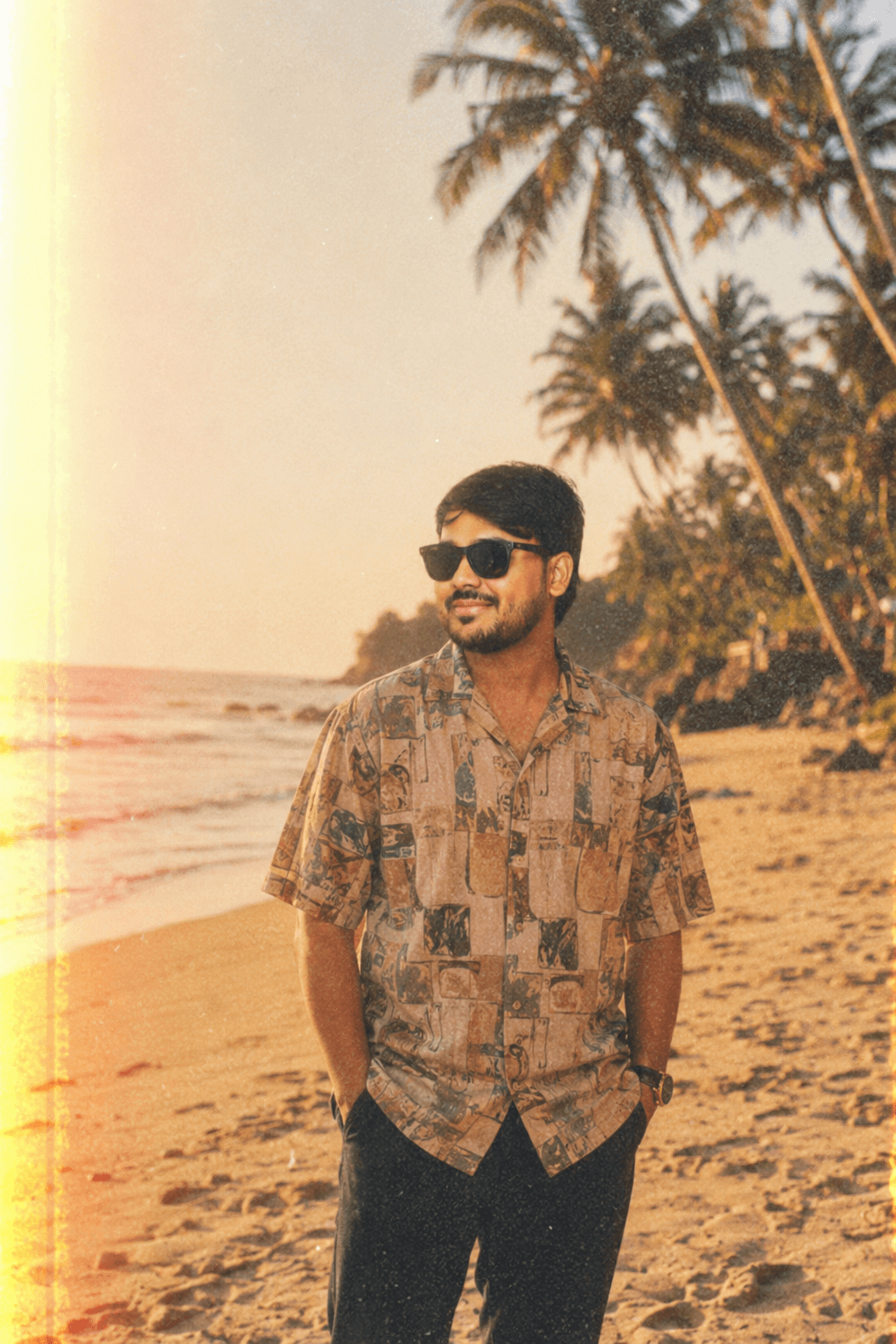
The Prompt
A raw, candid 1990s vintage analog film photograph, based on the face and features of
the input image subject (including sunglasses). The subject is standing at a sun-drenched
tropical beach during golden hour. The attire is changed from the input image to a loose,
patterned vintage 1990s short-sleeved linen shirt. Shot on Kodak Portra 400 film with heavy
film grain, natural light leaks on the edges, overexposed highlights, and soft focus.
Atmospheric, nostalgic, and emotional aesthetic. No digital smoothness.
What This Prompt Does
This ChatGPT photo editing prompt transforms any modern portrait photograph into a 1990s vintage analog film photo — complete with Kodak Portra 400 grain, golden hour warmth, natural light leaks, and the overexposed, slightly hazy look that makes a photo feel like it was pulled from a shoebox of old memories.
The output replaces the subject's clothing with a loose, patterned vintage linen shirt, teleports them to a tropical beach at golden hour, and wraps everything in the warm, grainy, imperfect beauty of real film photography — without touching the face, features, or identity of the person.
The result looks indistinguishable from a scan of an actual 35mm print from 1994.
How to Use This Prompt
Step-by-Step: ChatGPT (GPT-4o) — Best Results
- Open ChatGPT and start a new chat.
- Click the paperclip / image icon and upload a clear front-facing photo of your subject.
- Copy the full prompt from the box above and paste it into the message.
- Send — generation takes 15–30 seconds.
- If the face looks slightly different, reply: "Keep the exact same face, regenerate with stronger film grain and more light leak on the left edge."
Pro tip: Upload a well-lit, front-facing photo in daylight for best face retention. The cleaner your input photo, the more accurate the face in the output.
Step-by-Step: Gemini (Google)
- Go to gemini.google.com — use Gemini 1.5 Pro or Ultra.
- Upload your photo using the image icon.
- Paste the prompt and press Enter.
- Gemini renders the beach environment exceptionally well — palm trees, golden light, and wet sand all come through beautifully.
- Run 2–3 generations. The light leak position varies each time — pick your favourite.
Step-by-Step: Midjourney v6.1
- Use your photo as a character reference with
--cref [your-image-url]. - Paste the prompt, then append:
--ar 2:3 --v 6.1 --style raw --cref [your-image-url] --cw 85
- The
--style rawparameter reduces Midjourney's tendency to over-process — keeping that authentic film imperfection intact. - Add
--film grain 80for extra texture on supported versions.
Why This Prompt Produces Such Realistic Vintage Film
Every word in this prompt is doing precise technical work. Here is a line-by-line breakdown of what makes this one of the most effective vintage photo prompts available today.
"Raw, candid" — the most underused words in AI photography
The words raw and candid prevent the AI from composing a polished, symmetrical, "perfect" portrait. They push the model toward a slightly off-centre, natural stance — the way a person actually looks when a friend snaps a photo on the beach, not when they're posing for a professional shoot. This is 80% of what makes the output feel authentic.
"1990s vintage analog film photograph" — the era anchor
Specifying the decade (1990s, not just "vintage") narrows the AI's visual reference pool dramatically. 1990s film has a specific palette — warm shadows, slightly faded blacks, slight magenta in the highlights — that is different from 1970s Ektachrome or early 2000s digital. Always specify the decade for accurate results.
"Sun-drenched tropical beach during golden hour" — the light blueprint
Three environmental words do enormous work:
- Sun-drenched — forces direct, harsh, flattering beach sunlight (not overcast)
- Tropical beach — adds palm trees, white sand, clear water, and the right humidity haze
- Golden hour — the 45 minutes after sunrise or before sunset, producing the warm amber tones visible throughout the output
Remove "golden hour" and you get a flat midday beach. Keep it and you get that warm, cinematic, emotional light that makes people stop scrolling.
"Loose, patterned vintage 1990s short-sleeved linen shirt" — precise wardrobe control
This sentence controls four things simultaneously:
- Loose — prevents the AI from generating a slim-fit modern cut
- Patterned — adds the botanical/geometric prints typical of 90s resort wear
- 1990s — avoids contemporary H&M fits; pushes toward thrift-store era silhouettes
- Linen — adds the natural texture and slight wrinkle that reads as authentic vintage
"Kodak Portra 400" — the single most powerful film stock keyword
Kodak Portra 400 is the most widely documented and referenced film stock in photography history. Mentioning it by name triggers a highly specific visual response in GPT-4o and Midjourney:
- Warm skin tones with a slight orange push
- Fine but visible grain at ISO 400
- Natural highlight roll-off (not digital clipping)
- Slightly desaturated cool shadows
- Overall warmth bias toward amber and yellow
Portra 400 was the industry standard for portrait and editorial photography through the 1990s and 2000s. Every photography student shot with it. AI models have ingested thousands of scanned Portra 400 prints, making it one of the most reliably reproducible aesthetics in text-to-image generation.
"Natural light leaks on the edges" — the most viral film effect
Light leaks occur when the film canister isn't fully sealed from light, causing streaks of overexposure — typically in orange, red, or yellow. They were a common "mistake" in cheap or old cameras that has been completely embraced as an aesthetic choice by Gen Z and millennial nostalgia culture.
Specifying natural prevents the AI from adding heavy, Instagram-filter-style leaks. It keeps them subtle, organic, and on the edges (not covering the face).
"No digital smoothness" — the anti-AI-polish instruction
This is a crucial negative instruction. Without it, GPT-4o tends to apply subtle skin smoothing and colour correction that immediately reads as modern and digital. "No digital smoothness" tells the model to preserve imperfection — uneven skin, slight overexposure, gentle motion blur, and the beautiful imprecision that makes film photography emotionally resonant.
Kodak Film Stock Comparison — Choose Your Aesthetic
Different Kodak film stocks produce dramatically different moods. Swap "Kodak Portra 400" in the prompt with any of these:
| Film Stock | Colour Character | Best For | Mood | |---|---|---|---| | Kodak Portra 400 | Warm, natural skin, fine grain | Portraits, beaches, people | Nostalgic, emotional | | Kodak Ektar 100 | Vivid reds, saturated, sharp | Landscapes, travel | Bold, vibrant, editorial | | Kodak Gold 200 | High contrast, punchy yellows | Outdoor daylight | Cheerful, sunny, retro | | Kodak Tri-X 400 | Black & white, high contrast | Street, documentary | Gritty, timeless, moody | | Kodak Ultramax 400 | Slightly cooler, consumer feel | Casual snapshots | 2000s throwback, lo-fi | | Fuji Superia 400 | Cooler greens and blues | Outdoor, greenery | Fresh, slightly desaturated | | Fuji Velvia 50 | Highly saturated, punchy | Sunsets, nature | Vivid, dramatic, cinematic |
Beach Location Variations
Swap "tropical beach" with any of these locations for completely different results:
/* Goa — Indian coast at sunset */
a sun-drenched Goa beach at golden hour, coconut palms, fishing boats in the distance,
ochre sand, Indian Ocean waves

/* Maldives — luxury isolation */
a remote Maldives sandbank at dusk, turquoise shallow water, no visible horizon line,
complete stillness

/* Santorini — Mediterranean classic */
a sun-bleached Santorini cliff beach, white-washed walls visible, deep blue Aegean sea,
afternoon heat haze

/* Kerala backwaters */
the Kerala backwaters at golden hour, lush tropical canopy overhead,
still brown water reflections, wooden boat in background

/* Retro Goa 1990s hippy beach */
an early 1990s Anjuna Beach Goa, colourful hammocks, bonfires in distance,
vintage backpackers, warm sand, late evening light
Era Variations — Change the Decade
Replace "1990s" with any of these for a completely different time period feel:
| Decade | Film Stock to Add | Visual Signature |
|---|---|---|
| 1970s | Kodak Ektachrome E100 | Earth tones, high saturation, faded fade |
| 1980s | Fuji FP-100C Polaroid | Bold colours, slight blue cast, sharp |
| 1990s | Kodak Portra 400 (default) | Warm neutrals, natural grain, nostalgic |
| Early 2000s | Kodak Ultramax 400 | Slightly cool, slightly green, consumer |
| 2010s lo-fi | Lomography 400 | Heavy grain, colour shifts, dreamy blur |
How to Make the Output Even Better
1. Upscale with Magnific AI
After generating in ChatGPT or Gemini, paste the image into Magnific AI (magnific.ai) with the style prompt: "analog film scan, Portra 400, film grain, light leak." This upscales to 4K while preserving and enhancing the grain and imperfections — rather than removing them as standard upscalers do.
2. Add a Film Border in Canva
Download your output and bring it into Canva. Search "film frame" or "35mm border" templates. Adding a physical film border — complete with frame numbers and sprocket holes — takes the vintage illusion to 100%.
3. Run a Lightroom Preset on Top
For photo editors, importing the AI output into Lightroom and applying a VSCO A4 or A6 preset adds a final layer of authentic film colour grading. The AI grain + VSCO colour science = indistinguishable from a scanned print.
4. Desaturate the Shadows Slightly
In any photo editing app, pull the shadow saturation down by 15–20 points. Real film doesn't have richly saturated dark areas — this one tweak immediately makes AI-generated film photos feel more authentic.
Why Vintage Film AI Photos Go Viral on Instagram and Pinterest
The 1990s film aesthetic is one of the highest-performing visual styles on social media right now, for three compounding reasons:
1. Emotional nostalgia triggers across two generations. Millennials (born 1981–1996) recognise these photos from their actual childhood. Gen Z (born 1997–2012) has adopted analog aesthetics as a reaction against the over-polished digital feeds they grew up scrolling. Both groups stop and engage.
2. Imperfection signals authenticity in an over-filtered world. A photo with grain, light leaks, and soft focus doesn't look like it was edited — it looks real. In a feed of perfectly sharpened, HDR-boosted content, imperfection is the new luxury.
3. The colour palette is inherently warm and inviting. Kodak Portra 400's amber-orange warmth psychologically triggers comfort, safety, and warmth associations — exactly the emotional state that drives saves and follows.
Post this type of content between 7am–9am or 8pm–10pm local time for maximum algorithmic boost on Instagram Reels and Pinterest.
Frequently Asked Questions
Q: Will this prompt change my face in the output? The prompt explicitly instructs the AI to retain "the face and features of the input image subject." GPT-4o is currently the best model for face retention. Results may vary slightly — if the face changes, reply with: "Keep the exact face from the uploaded photo, only change the background and clothing."
Q: Does this work with group photos? Yes, but results are less reliable with multiple faces. For best results, crop to a single subject before uploading.
Q: Can I use the output commercially? Output from ChatGPT (DALL-E) and Gemini is generally usable for personal and commercial purposes under their respective terms of service as of 2026, but always check the current ToS before commercial publication.
Q: The light leak covers the face — how do I fix it? Add to the end of the prompt: "light leak restricted to the far left and right edges only, face and centre of frame fully clear."
Q: How do I get more grain? Add: "extreme heavy Kodak Portra 400 grain, high ISO noise visible in shadows, scan artifacts."
Q: Can I do this without a beach background? Absolutely. Replace "sun-drenched tropical beach during golden hour" with any environment:
- "a quiet Parisian café in the afternoon"
- "a sunlit Indian railway station platform"
- "a misty mountain trail at sunrise"
Related Prompts on NaukriResults
- Pinterest Scrapbook Moodboard — Combine this beach output with the moodboard collage prompt for a nostalgic travel diary effect
- Neo-Tokyo Cyberpunk Techwear — The cinematic opposite of this prompt: futuristic dark vs. warm analog
- Cinematic Portrait Golden Hour — Another golden hour variant, closer to editorial fashion photography